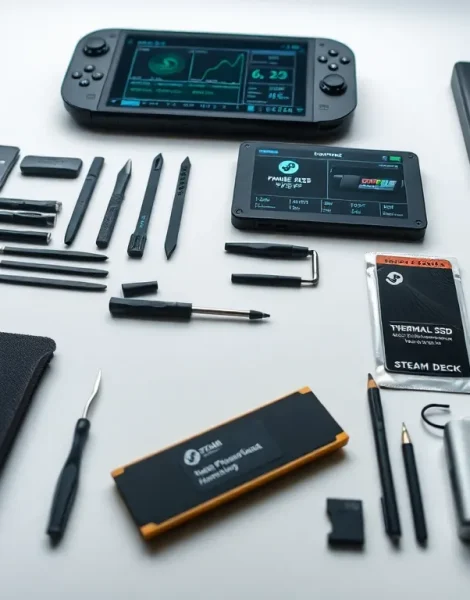
Steam Deck tools can transform a good handheld gaming experience into a great one. Valve’s portable powerhouse ships with impressive capabilities out of the box, but the right combination of hardware and software tools unlocks its full potential. Whether someone wants to swap out their SSD, boost frame rates, or run classic games from decades past, specific tools make these tasks possible. This guide covers the essential Steam Deck tools that every owner should have in their arsenal, from precision screwdrivers to performance-tuning software and everything in between.
Table of Contents
ToggleKey Takeaways
- Essential Steam Deck tools include precision screwdrivers, plastic pry tools, and anti-static gear for safe hardware upgrades and repairs.
- CryoUtilities and Decky Loader are must-have software tools that can boost performance by 5-15% and add powerful plugins to Gaming Mode.
- EmuDeck or RetroDECK automate emulator setup, letting you play classic games from Atari to PlayStation 3 in about 20 minutes.
- Heroic Games Launcher and Lutris expand your game library beyond Steam by adding Epic Games Store, GOG, and other platforms.
- A complete hardware toolkit for Steam Deck maintenance costs only $30-50 and pays for itself after one successful repair or SSD upgrade.
- Accessories like USB-C hubs, high-speed microSD cards, and 65W power banks maximize your Steam Deck’s versatility and playtime.
Hardware Tools for Maintenance and Upgrades
The Steam Deck’s modular design makes it surprisingly repair-friendly for a handheld device. Valve even partnered with iFixit to provide official replacement parts. But before anyone cracks open their device, they need the right Steam Deck tools for the job.
A quality precision screwdriver set is non-negotiable. The Steam Deck uses Phillips #0 and #1 screws throughout its construction. iFixit’s Pro Tech Toolkit remains a popular choice among Steam Deck owners because it includes the exact bits needed, plus plastic pry tools that won’t scratch the case.
Speaking of pry tools, plastic spudgers and opening picks help separate the back cover without damaging the clips. Metal tools can leave marks or crack plastic, a mistake that’s easy to avoid with proper gear.
For SSD upgrades, anti-static mats and wrist straps protect sensitive components from electrostatic discharge. A 2230 M.2 NVMe drive fits the Steam Deck’s internal slot, and many owners upgrade from the base 64GB model to 512GB or even 1TB drives. Thermal pads in the correct thickness (usually 1mm) ensure proper heat transfer after the swap.
Tweezers with fine tips help manage ribbon cables and small connectors. The Steam Deck’s battery connector, in particular, requires careful handling during any internal work.
These Steam Deck tools aren’t expensive. A complete kit for basic maintenance runs about $30-50 and pays for itself after a single successful repair or upgrade.
Software Utilities for Performance Optimization
Hardware tools handle the physical side. Software Steam Deck tools tackle performance.
CryoUtilities stands out as the most impactful optimization tool available. Developed by CryoByte33, this utility adjusts swap file size, swappiness, and memory management settings. Users report 5-15% performance improvements in many games after running it. The installation process takes about five minutes through Desktop Mode.
Decky Loader opens up a world of plugins accessible right from Gaming Mode. It adds a plugin menu to the Quick Access panel, where users can install tools like PowerTools (for CPU management), ProtonDB Badges (showing game compatibility ratings), and SteamGridDB (for custom artwork). Decky Loader has become essential for anyone who wants Steam Deck tools at their fingertips without switching modes.
ProtonUp-Qt manages Proton and Wine versions. Different games run better on different Proton versions, and this tool makes switching between them simple. It also installs Proton-GE, a community build that often fixes issues before official Proton updates arrive.
MangoHud provides real-time performance monitoring. Frame rate, frame times, CPU and GPU usage, temperatures, and power draw all display as an overlay during gameplay. It helps identify bottlenecks and verify that optimization tweaks actually work.
For battery life, the built-in performance overlay (accessed by pressing the “…” button) lets users cap frame rates and adjust TDP limits. These Steam Deck tools ship with the device but many owners overlook them.
Emulation and Gaming Tools
Emulation represents one of the Steam Deck’s strongest use cases. The hardware handles everything from Atari 2600 to PlayStation 3 with the right Steam Deck tools installed.
EmuDeck automates the entire emulation setup process. It downloads and configures emulators, sets up folder structures, scrapes artwork, and adds games to Steam for easy access in Gaming Mode. What would take hours manually happens in about 20 minutes with EmuDeck.
RetroDECK offers an alternative approach. It packages emulators into a single Flatpak application with a unified interface. Some users prefer this contained approach over EmuDeck’s distributed setup.
For individual emulators, RPCS3 handles PlayStation 3 games, Yuzu and Ryujinx run Nintendo Switch titles, and PCSX2 covers PlayStation 2. Dolphin emulates GameCube and Wii with excellent performance on the Steam Deck’s hardware.
Non-Steam game launchers deserve mention here too. Heroic Games Launcher brings Epic Games Store and GOG libraries to Linux. Lutris handles games from various sources and manages Wine configurations automatically. These Steam Deck tools expand the device’s library well beyond Steam’s catalog.
ROM managers like Steam ROM Manager (included with EmuDeck) add emulated games directly to the Steam library with proper artwork. Games launch from Gaming Mode just like native titles.
File Management and Desktop Mode Applications
Desktop Mode turns the Steam Deck into a functional Linux computer. Several Steam Deck tools make this mode more useful.
Flatseal manages permissions for Flatpak applications. Many Discover store apps need additional permissions to access certain folders or features. Flatseal provides a graphical interface for these adjustments instead of requiring terminal commands.
KDE Partition Manager handles drive formatting and partitioning. It’s useful for setting up SD cards with specific file systems or managing storage across multiple drives.
FileZilla and WinSCP (through Wine) enable file transfers between the Steam Deck and other computers. SSH access works too, but graphical FTP clients feel more intuitive for most users.
Syncthing synchronizes files across devices automatically. Save files, screenshots, and game configurations stay backed up without manual intervention. It runs in the background with minimal resource usage.
For web browsing, Firefox comes pre-installed but Chromium-based browsers like Brave offer better performance on some sites. Browser-based streaming services (Netflix, YouTube) work better in Desktop Mode than through Steam’s built-in browser.
Terminal emulators like Konsole provide access to command-line Steam Deck tools. Package management, system updates, and advanced configurations all happen here. Even users who prefer graphical interfaces occasionally need terminal access.
Accessories That Complement Your Steam Deck Setup
Physical accessories round out a complete Steam Deck tools collection.
A quality carrying case protects the device during travel. The official Steam Deck case works well, but third-party options from JSAUX and Tomtoc offer more storage pockets for chargers and accessories.
USB-C hubs expand connectivity options. Look for hubs with HDMI output, USB-A ports, and Ethernet. Power delivery passthrough lets users charge the Steam Deck while using the hub. JSAUX’s docking stations designed specifically for Steam Deck fit the device’s form factor perfectly.
High-speed microSD cards add storage without opening the device. Samsung’s EVO Select and SanDisk Extreme lines deliver read speeds fast enough for game loading. A 512GB card costs around $40 and effectively doubles storage capacity.
Screen protectors prevent scratches on the display. Matte protectors reduce glare for outdoor gaming but slightly soften the image. Glossy protectors maintain image clarity but show fingerprints more easily.
External controllers connect via Bluetooth or USB for docked play. The Steam Deck’s built-in controls work fine on a TV, but a proper controller feels better for extended sessions. Xbox controllers pair instantly: PlayStation controllers require some setup.
Portable power banks extend gaming sessions beyond the Steam Deck’s 2-8 hour battery life. Banks with 65W USB-C PD output charge the device while playing. A 20,000mAh bank roughly doubles total playtime.